
1. Add your bank deposits and your jobs
2. What got paid and what is still owed
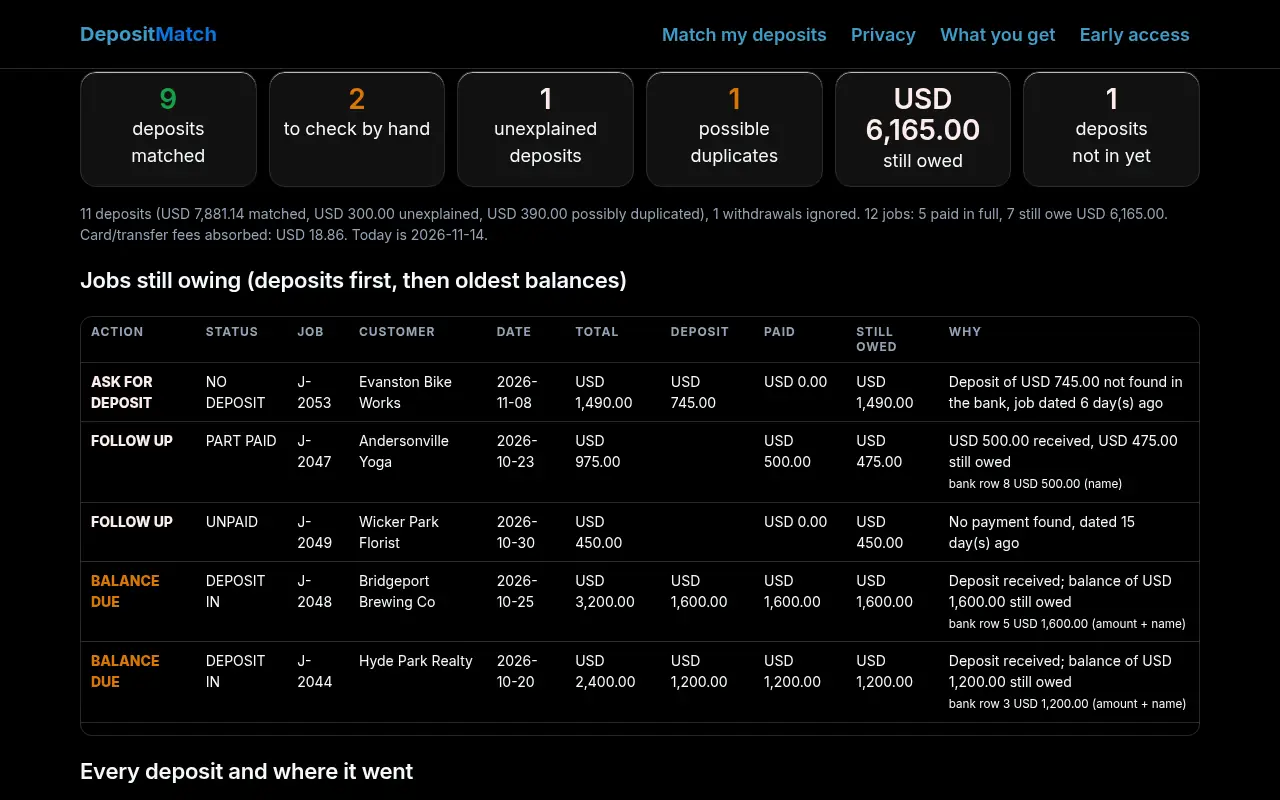
Jobs still owing (deposits first, then oldest balances)
Every deposit and where it went
Payment reminders, one per customer
Edit and copy into your own email or text. DepositMatch never sends anything.
Every job, with its status
How it works
How a deposit is matched
In order: the bank text names the job or invoice number; the amount equals a deposit, balance or full total and the customer's name is in the bank text; the amount is the only open job with that exact figure (marked check); one deposit adds up to 2 or 3 open jobs (a batched payment); or a named customer paid part of their one open job. Anything else stays unmatched, so nothing is guessed silently.
Deposits and balances
Add a deposit column and each job knows what to expect: first the deposit, then the balance. Jobs show as paid, deposit in (balance due), no deposit yet, part paid, unpaid or overpaid.
Card and transfer fees
Card processors often send the payment minus their fee. A deposit up to 3.5% + USD 0.50 short of what was owed (you can change this) still matches, and the gap is shown as fees, not as money the customer owes.
Duplicates and leftovers
Two bank rows with the same date, amount and description are flagged as a possible duplicate import instead of being counted twice. Deposits with no fitting job are listed so you can find the job that is missing from your list.
DepositMatch reads the two lists you paste. It does not connect to your bank or accounting software, does not change your books, and sends nothing to customers. It is a matching aid for you to review, not bookkeeping, accounting or tax advice.
Privacy
Your bank and job data stay in your browser. Everything you paste or upload is read and processed by JavaScript on this page. Nothing about your deposits, customers, jobs, amounts or reminders is uploaded, stored or shared.
The site sends two kinds of things to its own server and nowhere else. 1. The waitlist form, only if you submit it: your email and two optional answers, kept in a private Cloudflare KV list used only to email you about DepositMatch. 2. Anonymous usage counts: an event name (page view, sample run, own-list run, download, copy, waitlist seen, error) plus the country Cloudflare reports. No cookie, no ID, no IP address, no browser fingerprint and no content from your lists. If your browser sends Do Not Track or Global Privacy Control, no usage counts are sent at all. We use the counts only to decide whether DepositMatch is worth building further. They are stored only as daily totals per event and deleted after 6 months at most.
No ads, no third-party scripts, no tracking cookies. To have your waitlist entry deleted, email smurphy@roicpleadgen.com.
See it work
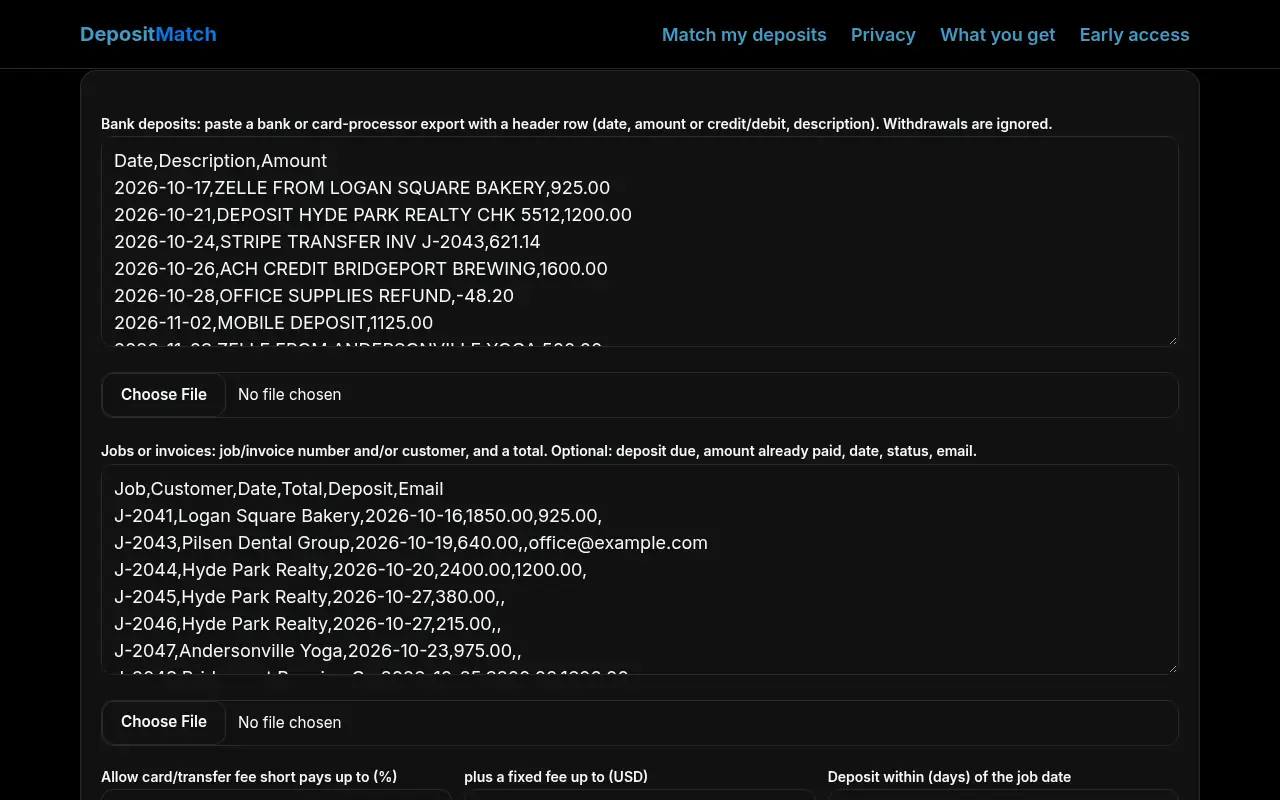
Real screenshots of DepositMatch on this page, taken in a headless browser with the built-in sample data. Sample data only; nothing was uploaded.
What you get
DepositMatch is free during early access. No card and no sign-up to use the tool on this page. Join the waitlist and we'll email you before anything changes.
Today, free in your browser
- Each deposit paired with the job it paid
- Deposits and balances still owed
- Batched payments and card-fee short pays
- Possible duplicate bank rows
- One payment reminder per customer
Planned, if the waitlist asks
- Remembers your jobs and payer names between weeks
- Learns which bank text belongs to which customer
- A weekly "still owed" email to you
- Several bank accounts or locations
- Payout splitting for card processors
Want DepositMatch to remember your customers and check every week?
We'll only email you about DepositMatch. No spam, unsubscribe any time.
Prefer email? smurphy@roicpleadgen.com
Questions
Is my data uploaded?
No. Both lists are processed on this page. Only anonymous event counts (no content) and the optional waitlist form ever reach our server.
Which exports work?
Any CSV or pasted table with a header row. Bank: a date, an amount (or separate credit and debit columns) and a description. Jobs: a job or invoice number and/or customer, and a total; deposit due, amount already paid, date, status and email are optional. QuickBooks, Xero, Jobber, Housecall Pro, Square and spreadsheet exports all work; column names are matched loosely.
What if one customer has two jobs with the same amount?
If the bank text names the job number, that wins. If not, the oldest open job for that customer is used and the row is marked check. Same-amount jobs for different customers with no name in the bank text are left for you to pick.
Does it email my customers?
No. It writes reminders you copy into your own email or text, so you decide what goes out.
How is this different from QuickBooks bank matching?
Accounting software matches one bank line to one open invoice it already knows. DepositMatch works from whatever list you have (even a spreadsheet of jobs), understands deposit-then-balance jobs, suggests batched payments and fee short pays, and needs no account.